A morning with Aularium
A last-minute absence, from start to finish. No phone calls, no group chats and no paper.
- 7:48
Lucía can't come in
She reports it from her phone in a minute and sets work for each group. Only the head of studies sees the reason.
- 7:48
Her lessons are already covered
Aularium creates a cover slot for each lesson she misses and assigns it to whoever has done the fewest this year.
- 7:49
Everyone knows their slot
The covering teacher gets a phone alert with the group, the room and the work set. By email too, if the school wants.
- 8:15
The staff room is up to date
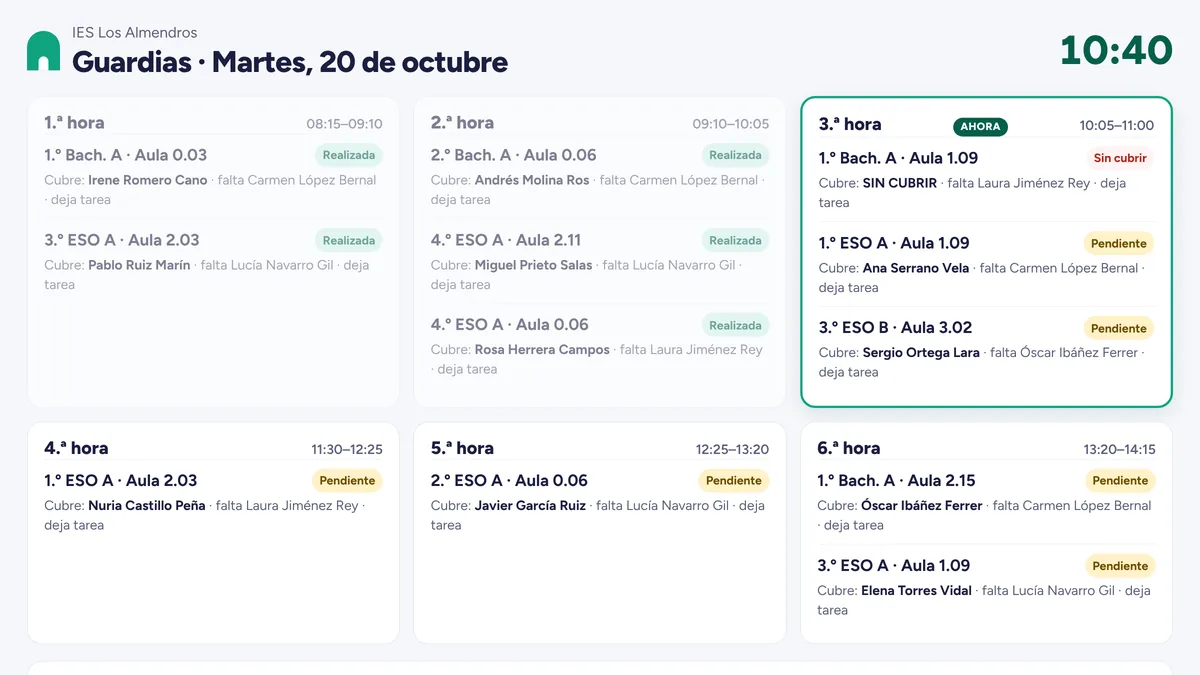
The screen shows all the day’s cover, period by period, and updates itself.
- 10:05
Confirmed in the classroom
The teacher on cover scans the room’s QR code and the slot is marked as done.
- 14:15
The head of studies has it all
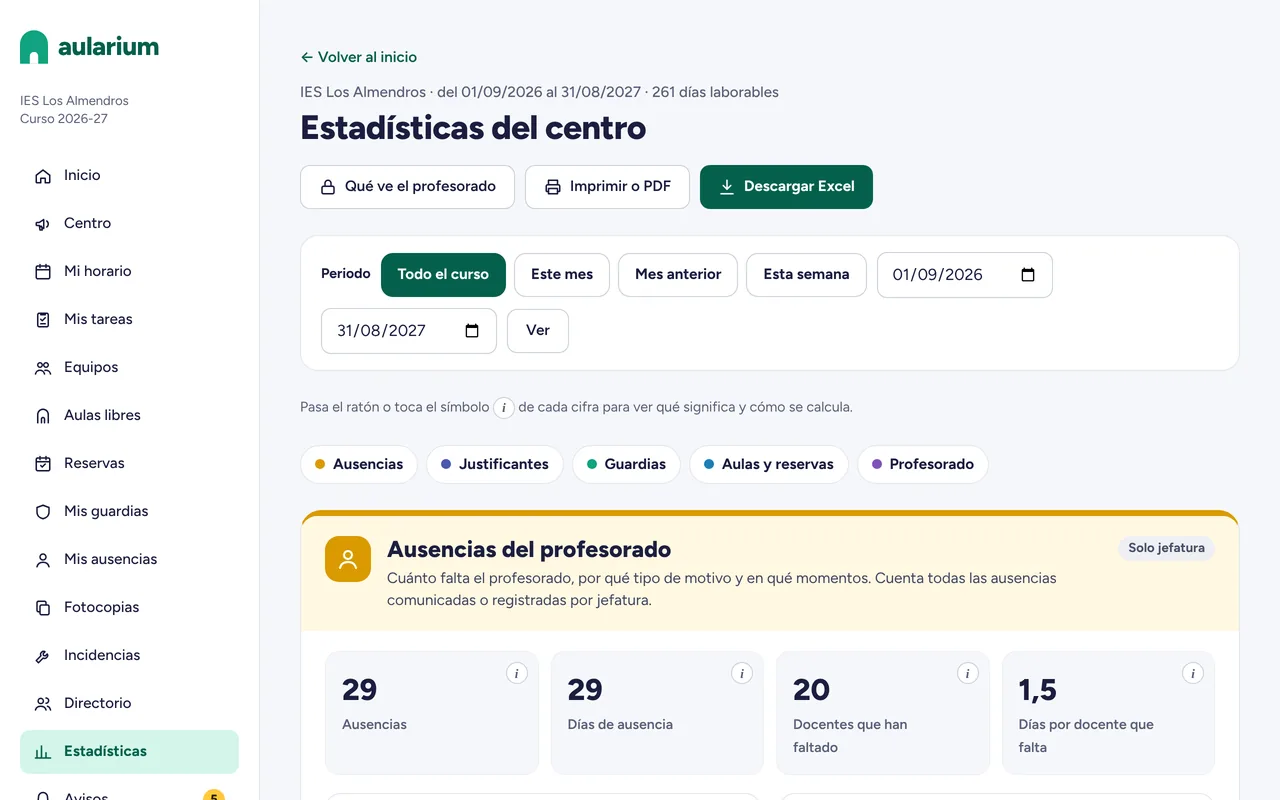
What was covered, what was left uncovered and the year’s cover distribution, ready to download in Excel.
What stops happening at your school
Cover eats up hours of the head of studies’ week. Aularium takes over the mechanical part.
- BeforeMessages at 7:45 asking who is covering whomWith AulariumCover is assigned automatically as soon as someone reports an absence, and the covering teacher is alerted.
- BeforeThe paper cover sheet, crossed out and redoneWith AulariumA staff-room screen that updates itself, and every teacher sees their own slots on their phone.
- Before“It’s always me”With AulariumIt goes to whoever has done the fewest. Every teacher sees their own count and the school average.
- BeforeHunting for a free room corridor by corridorWith AulariumFree rooms for each period at a glance, and labs, laptop trolleys or the hall booked in two taps.
- BeforeAbsence notes that arrive late or go missingWith AulariumEach absence with its supporting document and deadline, all reviewed in one place.
Everyone sees what they need
One tool for the whole school, with just what each role needs.
Head of studies
- At a glance: lessons to cover today, uncovered slots and documents to review.
- Records absences on behalf of any teacher and manages long-term leave with a substitute.
- Leave requests with their application and decision.
- Decides what teachers can do and which parts of Aularium the school uses.
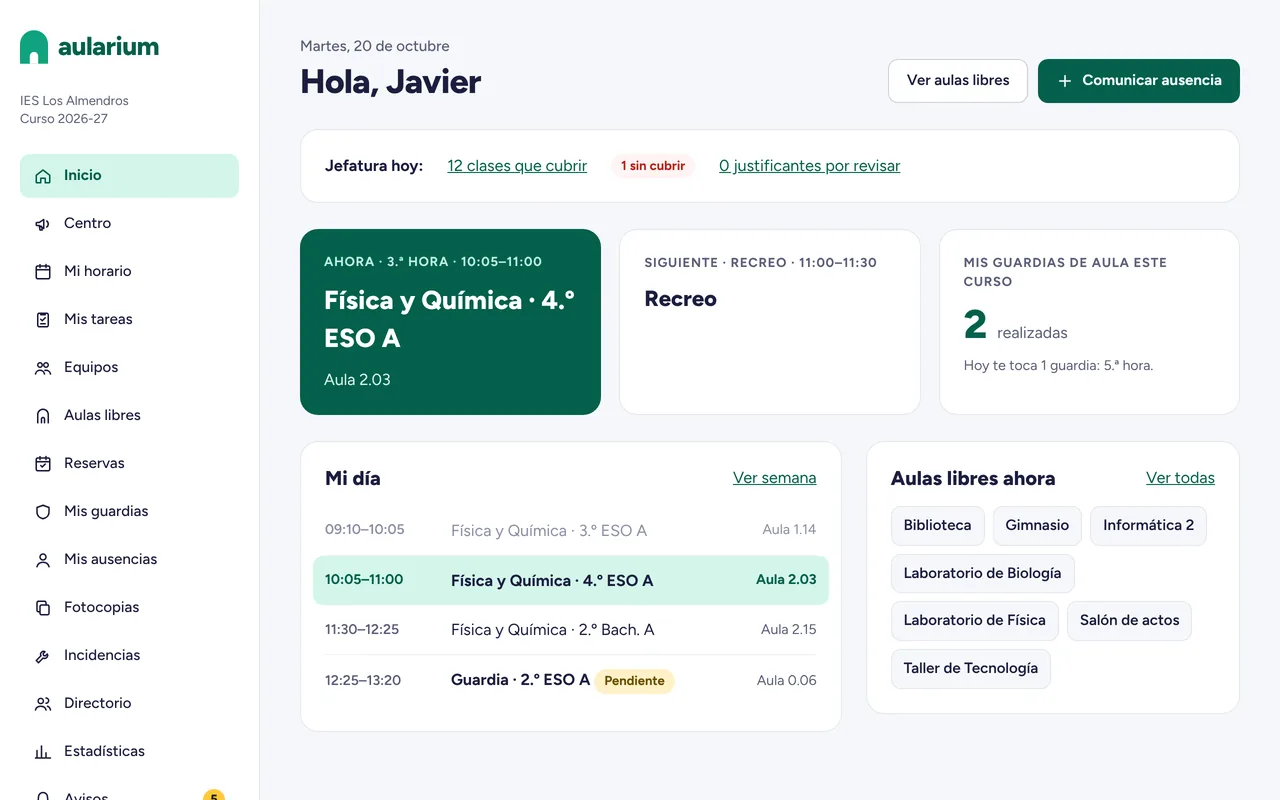
Teachers
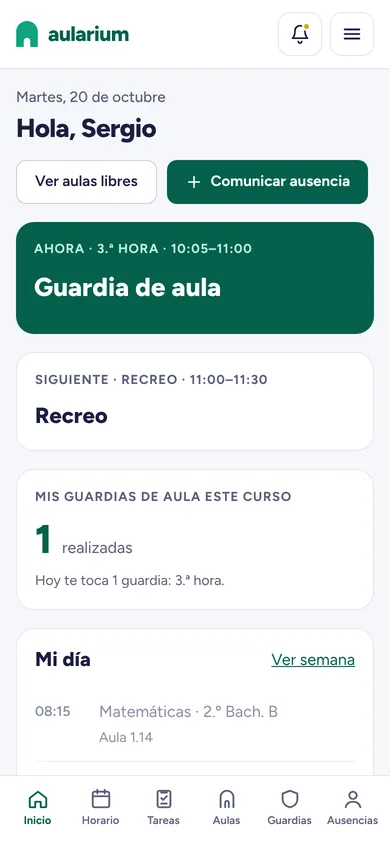
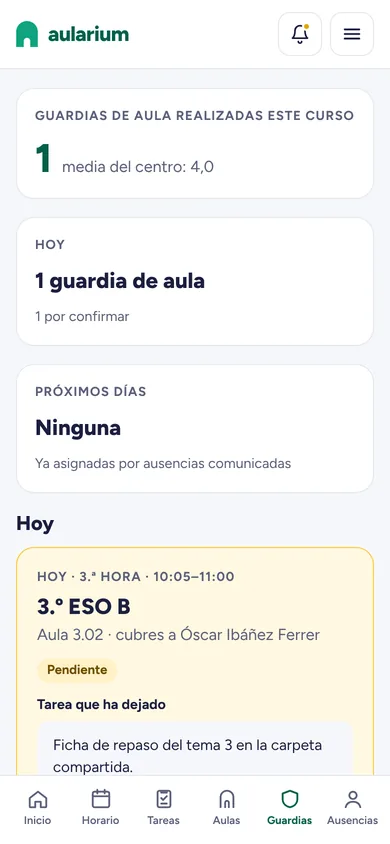
- Report an absence from their phone and set work for their groups.
- See their timetable, their cover and the work a colleague has set.
- Get alerts on their phone, without relying on any group chat.
- Add their timetable and cover to their phone calendar.
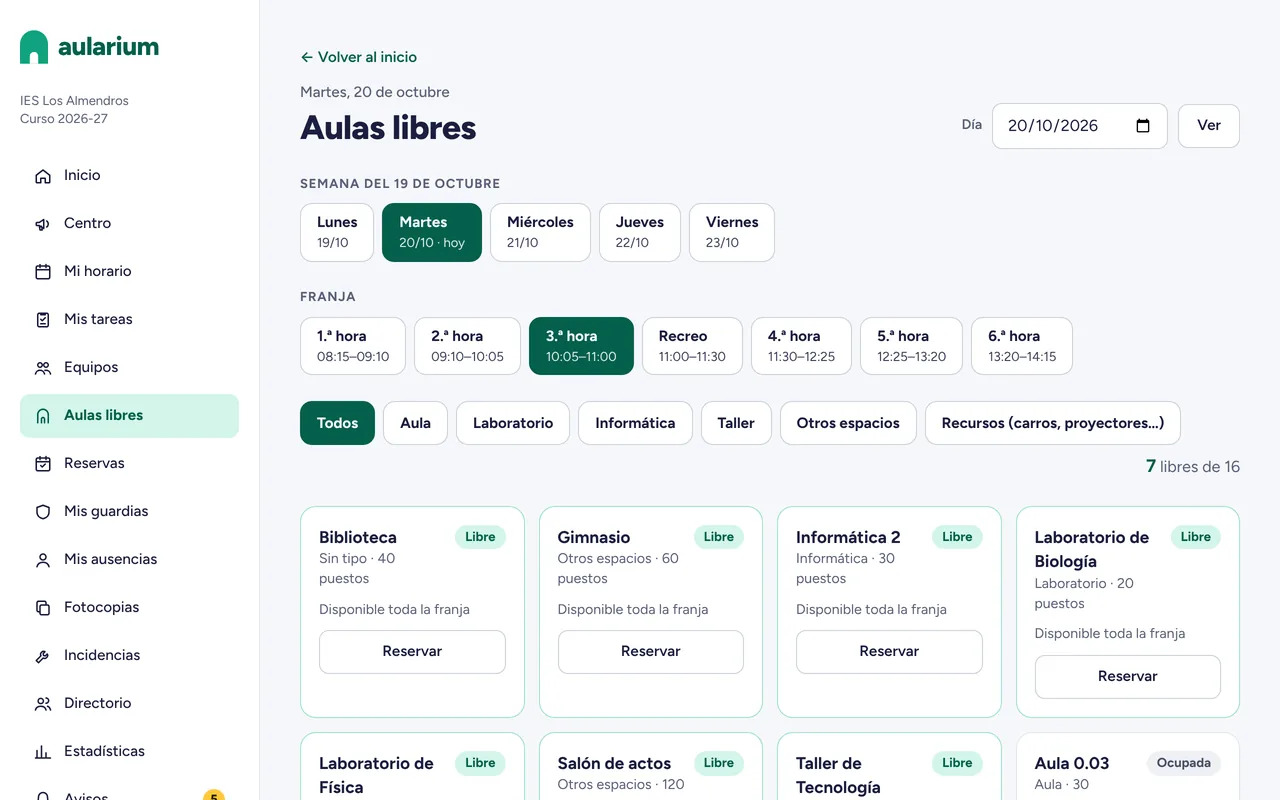
Rooms and bookings
- Free rooms by day and period, filtered by type of space.
- Book labs, rooms and resources such as laptop trolleys or projectors.
- Weekly repeating bookings, if the school allows them.
- No clashes: if it is taken, it cannot be booked.
Statistics
- Absences, documents, cover, room use and staff, by period.
- Every figure explains what it means and how it is calculated.
- Download in Excel or print to PDF.
- The head of studies decides what other staff can see.
A screen that updates itself
Point any TV or computer in the staff room to its secret link and you will see the day’s cover, period by period: which group, which room, who is covering and whether it has been done. No need to touch anything.
- Highlights the current period and any slots still uncovered.
- Can show first names and initials only.
- The link can be changed with one button if it stops being secret.
Up and running in three steps
Import your timetable
Upload the Peñalara GHC file or an Excel template. Aularium loads teachers, groups, rooms and cover periods.
Give staff access
Send logins by email or print them. Each teacher signs in on a computer or installs it on their phone like an app.
And off you go
When someone is absent, cover is shared out automatically, alerts go out and the staff-room screen updates.
Everything that's included
Start with cover and switch the rest on whenever you like. Each school chooses which parts it uses.
Automatic cover
Fair distribution: whoever has done the fewest first; on a tie, whoever has gone longest without one.
Absences and documents
Teachers report it, set work and attach the supporting document within the deadline.
Leave requests
Application, documents and the head of studies’ decision, all in one place.
Long-term leave and substitutes
When the substitute arrives they take over the timetable, and those days no longer create cover.
Bookings
Rooms, labs and resources, including weekly repeating bookings.
Free rooms
Which spaces are free each period, with one tap to book them.
Staff-room screen
The day’s cover on the staff-room TV, always up to date.
QR confirmation
Each room’s code confirms the cover was done. Print them straight from Aularium.
Phone alerts
Instant alerts on the phone and, if the school wants, a copy by email.
Timetable in your calendar
Your timetable and cover in your phone calendar, always up to date.
Statistics
Absences, cover and room use by period, in Excel or PDF.
Tasks
Senior staff assign tasks to teachers and see who has done them.
Photocopies
Order them from your phone; the reception staff have their own screen to prepare them.
Issue reports
IT and maintenance issues with a photo, and each person in charge sees theirs.
Suggestion box
With the option to send suggestions anonymously.
Teams and minutes
Departments and teaching teams with their meetings and minutes.
Notices and calendar
Noticeboard, school calendar, staff meetings and office messages.
Tailored to your school
The head of studies switches each part on or off and decides what teachers can do.
Only what is needed
Aularium organises staff, not students: it works with groups and rooms, never with student data. And the most sensitive part of an absence, the reason, stays with the head of studies.
- The type of absence is only visible to the head of studies and the absent teacher.
- Alerts reach the phone empty and are filled in from Aularium: their content never passes through Google’s or Apple’s servers.
- Access log, adjustable retention periods and full export or deletion of the school’s data.
- A data processing agreement ready for the school to sign.
What about assessment? Meet Evalúat
Evalúat is the teacher’s grade book with each Spanish region’s LOMLOE criteria preloaded, and it works out every criterion, competence and subject grade. It can be used with the same account as Aularium.
See EvalúatFrequently asked questions
What is Aularium?
A web app for running a school’s day-to-day: teacher absences, cover, substitutes, leave requests, room bookings and the staff-room screen, among other things.
How does it decide who covers each lesson?
Among the teachers on cover duty that period, it goes to whoever has done the fewest classroom cover slots this year. On a tie, to whoever did their last one longest ago, and if still tied, it is drawn at random. The reason is noted on the slot and the head of studies can change it by hand.
Do I have to enter the timetable by hand?
No. Aularium imports the Peñalara GHC exchange file or an Excel template, and checks the data before loading it.
Do we need to install anything?
No. It runs in the browser on a computer, tablet or phone. On a phone it can be installed like any other app, without an app store, to receive alerts.
Does it store student data?
No. Aularium works with groups, rooms and staff. It neither asks for nor stores student data.
Who sees the reason for an absence?
Only the head of studies and the absent teacher. Other staff see that there is a lesson to cover, never why.
Can we use just one part?
Yes. The head of studies switches each part on or off (photocopies, issue reports, tasks, suggestion box…) and decides what teachers can do.
Does it work with Evalúat?
Yes. Aularium and Evalúat can be used with the same account: Aularium for running the school and Evalúat for each teacher’s assessment.
What does being a founding school mean?
Founding schools are the first to sign up. We write to you personally to see what your school needs and set it up with you, your suggestions shape the next versions, and you get terms reserved for founding schools.
Make your school one of the first
Leave your school's details and we'll write to you personally. No commitment.
- We get in touch to see what your school needs and set it up with you.
- Your suggestions shape the next versions.
- Terms reserved for founding schools.